• Cart$0
  • My Account
  • Blog
  • Logout

Apps Magnet

  • Products
  • Demo
  • Tips & Videos
  • Help

Archive for month: February, 2009

SCRUM in under 10 minutes video

this entry has 2 Comments/ in Recommended Reading / by Apps Magnet
February 27, 2009

SCRUM is an excellent agile project management methodology. Our Reports module for activeCollab (and our own project / product development methods) are heavily inspired from SCRUM.

Here’s a quick video that will teach you core concepts of SCRUM in just 8 minutes! It’s a must watch!


Video courtesy Axosoft.

Do you use SCRUM? Are you a Reports module customer? How do you use it?

Picture Puzzle – a Mac OSX Memory Test Game

this entry has 3 Comments/ in News / by Apps Magnet
February 25, 2009
This product is no longer maintained.

Aimed for the moon, but reached on mars! This is what happened to us. We applied for an iPhone developers account at start of December. It’s been about 3 months now, and we have not got the Developers Account despite sending all documents and repeated followups.

We have 4 iPhone products ready to deploy, but our hands are tied because we don’t yet have a developer’s account. The frustration levels went so high, we decided to just drop the plans to release these products.

Then we got an idea! Why not release them on the Mac?

So from frustration to joy, we present to you Picture Puzzle!

Download Picture Puzzle (8M, free, Mac OSX)

Download Picture Puzzle (8M, Mac OSX)

main-screen-picture-puzzle-memory-test

Picture Puzzle is a Mac OSX memory test game. You see a collection of pictures one after another. The objective of the game is to arrange them in right order after initial display. This tests how well you can remember the order of images. It stimulates your brain and helps you remember things better.


picture-view

arrange-pictures

Apply all memory tricks you may have learned. Tell us if you beat the game!

Download Picture Puzzle (8M, free, Mac OSX)

Download Picture Puzzle (8M, Mac OSX)

It’s a free download!

Do you have an iPhone Developer Program sad story? Let us know!

Do you think you have good memory?

this entry has 0 Comments/ in News / by Apps Magnet
February 23, 2009

If you think you have sharp memory and can remember well, wait till tomorrow!

Frequency of scheduled task – is once a week ok?

this entry has 0 Comments/ in activeCollab Hacks, Reports / by Apps Magnet
February 17, 2009

Got a question from a customer:
I am setting up a cron using a third party service. Do I have to set cron to execute the tasks both frequently, hourly and daily (or is it sufficient once a week?)

Our Answer:

If you set up frequently, hourly and daily it will make activeCollab happy! (The new Incoming Mail module uses frequently job to pull emails).

For Reports, once a week is sufficient, but you will need to ensure it gets called on the day your week starts (as per aC configuration you have). Webcron.org may be in some other timezone than your server. So you will need to ensure it gets fired at correct time. When cron gets executed, it checks if this is the start of the week, if so, it will take reporting snapshots.

Every week, on start of week (e.g. Monday) we take snapshot of previous week.

Scheduled Tasks – what if my server does not support cron?

this entry has 0 Comments/ in activeCollab Hacks, Reports / by Apps Magnet
February 17, 2009

If your host does not have crontab / scheduled task enabled, your reporting data will not update. For best results you should have Scheduled Tasks configured and working for activeCollab.

If your server has a web based control panel (cPanel, Plesk etc), there are good chances you can configure cron jobs with it. If you have shell access to the server (SSH), you can easily configure cron jobs from command line (crontab -e).

If all that fails, what are my alternatives?

Alright, so life is really making it difficult for you, you have two alternatives.

  1. Re-install Reports module every week. When Reports module installs, it collects all historical data about your projects. Re-installing it (uninstall, and then install) will refresh your data.
  2. Run cron from another computer. Either set it up on your desktop or use a third party service to run scheduled tasks (e.g. Webcron.org). Just ensure your are using correct URLs of your activeCollab installation. Reports module needs the daily cron / scheduled task to be executed.

Reports icon not showing in Access theme

this entry has 2 Comments/ in activeCollab Hacks, Reports / by Apps Magnet
February 17, 2009

If you are using Access theme with activeCollab, Reports icon does not show up in main menu. You do see a menu item and can click on it, but it is missing an icon.

Why does this happen?

Access theme uses a custom CSS file to override look and feel of activeCollab. By default it hides any unknown styles. They do not have an icon for Reports module yet. This results in no icon showing for Reports module.

How to fix it?

It’s easy to fix this. Here are the steps:

  1. Copy public/assets/modules/reports/images/icon.gif to public/assets/themes/Access/images/icons/reports.gif. Note we are copying as reports.gif, not icon.gif.
  2. Edit theme.css in public/assets/themes/Access/. Search for #menu_item_status in it. It may have another line for invoicing module after it. Add this line: #menu_item_reports span.outer {background: transparent url(images/icons/reports.gif) no-repeat center 15px;}
  3. Save the file and exit.
  4. Refresh your activeCollab page. Reports icon should now show up.
  5. If it does not, check permissions on reports.gif that you copied. Ensure it has same permissions as other images in icons folder.
  6. If you notice that the icon is not positioned properly in the menu, ensure you have used 15px and not 10px like other Access theme icons.

If this does not work, post a comment here with some more details and we will sort out!

BTW,  we have already requested Leon (Access theme developer) to include a Reports icon. We are still to hear from him.

Demo video: Reports Module for activeCollab Project Management System

this entry has 12 Comments/ in Reports / by Apps Magnet
February 12, 2009

Want to see how the reports module looks? Here’s a quick demo video showing you installation, configuration and usage of our reports module for activeCollab project management system.

What do you think?

Are you ready to buy? It’s just $39!

Buy Now

Reports Module Documentation

this entry has 5 Comments/ in Reports / by Apps Magnet
February 12, 2009

Welcome to this introduction to Reports module for activeCollab. In this quick article, we will see how to install, use and make decisions with this exciting new module for activeCollab – a superb project management system.

reports-overview-scaled

Let’s get started.

Documentation Subjects

Click on a subject to learn more about it.

  • Installation, Configuration & Scheduled Tasks
  • Charts: Burndown Chart, Iteration Chart, Hours Chart
  • Useful Info: Most Active Tickets, Longest Open Tickets, Project Velocity
  • How do we create these reports?
  • Filtering by dates, Navigating projects and Legends

Introduction Video

We have a superb introductory video on Reports module. In well under 5 minutes, you can learn how to setup and use Reports module with your activeCollab setup!

Need Support? Have an idea?

Do you have some feedback for us? An idea to improve? Some problem we missed out? We are eager to listen. Please give us your feedback.

Filtering by dates, Navigating projects and Legends

this entry has 0 Comments/ in Reports / by Apps Magnet
February 12, 2009

Reports Dashboard Options

Filter by Dates

date-range

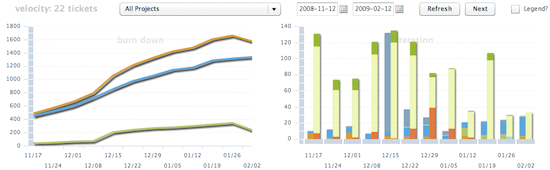
You can filter reporting period by selecting dates in two date selectors at top. The first is starting date and second is end date. Click on the calendar next to a date field to select another date. Click on Refresh button to reload reports for this date range.

Navigating Projects

projects-list

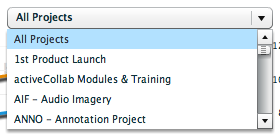
At the top of your Reports Dashboard, you will see a drop down list of projects you have access to. Select any project from this list and click on Refresh to update reports.

next-buttonWe anticipated that you may want to review all your projects once a week. We simplified this operation with the Next button. Click on Next to load reports for next project in your list. Review reports and click Next again to move to another project.
Legends

legend-visible

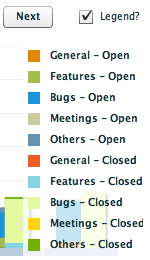
We did not want legends to obstruct your view, so we kept them hidden. You can toggle them by checking the Legend box at top right. When on, this will show you color code legends for all your charts.

How do we create these reports?

this entry has 0 Comments/ in Reports / by Apps Magnet
February 12, 2009

Background Magic

reports-snapshot

We create these reports by taking a snapshot of your projects. We store reporting trends for last week at the start of each week. This is how we get weekly progress reports. And this is the reason why we need Scheduled Tasks running!

This data – burndown, iteration, hours – is not updated during a week. So if you come back to these reports during a week, you will not see any updates. The only real time data is Most Active Tickets and Longest Open Tickets.

Page 1 of 212

Recent Comments

  • Marie Malíková on 5 Reasons Why Your Team Does Not Use Your Project Management System
  • Damien Wilson on 5 Reasons Why Your Team Does Not Use Your Project Management System
  • uno guio on Apps Magnet Auto Updater module for activeCollab is now free!
  • David Minton on activeCollab Feather – are you ready for it?
  • Scott McNamara on activeCollab Feather – are you ready for it?

From Our Blog

  • activeCollab Feather – are you ready for it?
  • Faster Reports Plus Module
  • Chronograph Module Updated!

Categories

  • acGarage
  • acJournal
  • activeCollab
  • activeCollab Hacks
  • Communications
  • Customer Experiences
  • General
  • Modules
  • News
  • Paypal & Putler
  • Pigeon
  • PlannerX
  • Planning
  • Recommended Reading
  • Reports

Quick Links

  • About Us
  • Products
  • aC Compatibility Status
  • Live Demo
  • Resources
  • Blog
  • Contact Us

Latest from our blog

  • activeCollab Feather – are you ready for it?June 11, 2015 - 5:38 pm
  • Faster Reports Plus ModuleMay 5, 2015 - 6:40 pm
  • Chronograph Module Updated!April 21, 2015 - 4:54 pm

Learn About

  • 8 Tools For Project Success – that I have used for over a decade with awesome results…February 25, 2014 - 12:05 am
  • Ultimate Guide to Integrating your site with activeCollabIntegrate activeCollab with your website – The Ultimate GuideFebruary 20, 2014 - 1:52 am
  • Two Keys To Team Development2 Keys To Team DevelopmentFebruary 18, 2014 - 6:07 pm

Apps Magnet Network

  • Icegram – Capture Leads & Connect With Visitors – WP plugin
  • Putler – Life Changing Sales Analytics App
  • Store Apps – WooCommerce & WordPress plugins
© All rights reserved - Apps Magnet
  • Follow us on Twitter
  • Subscribe to our RSS Feed